
Find any case again
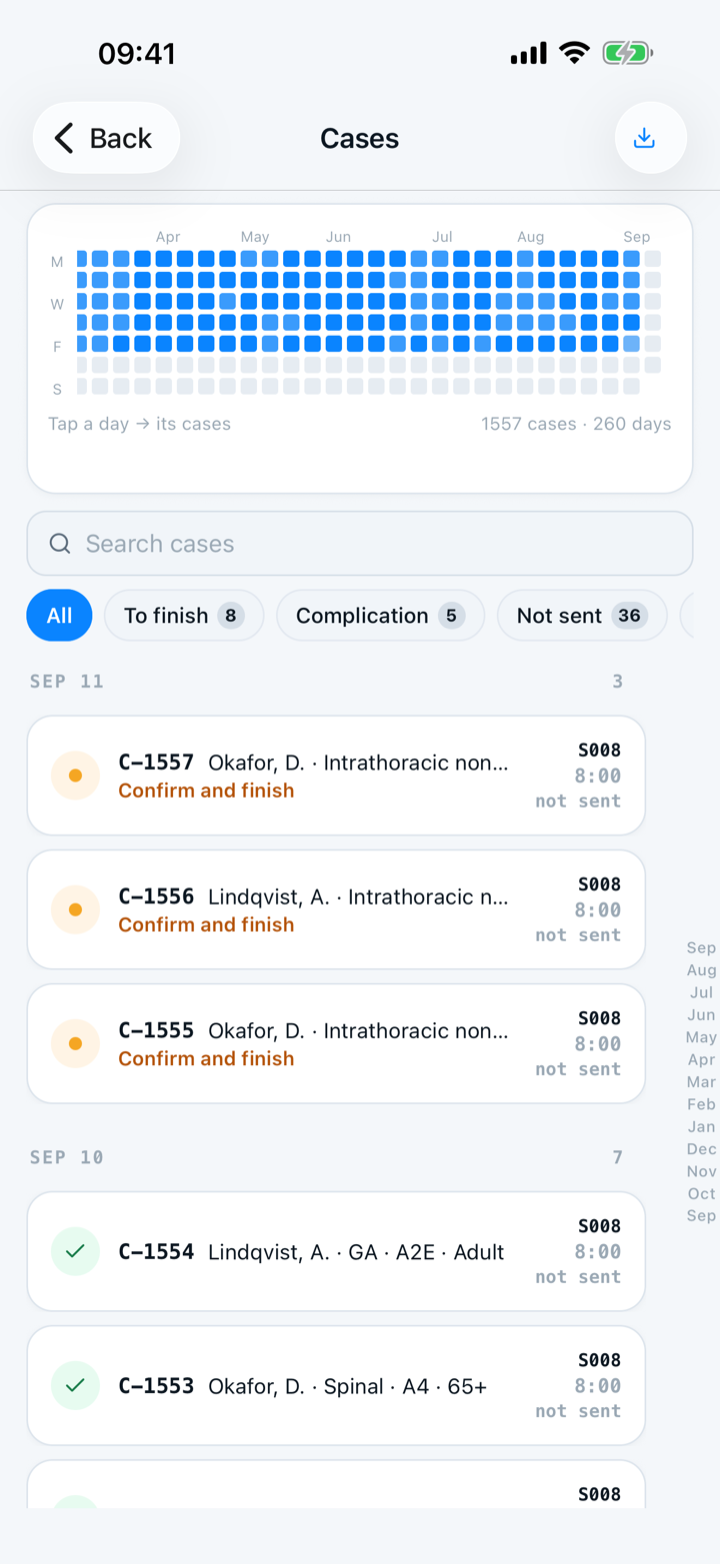
Type any detail you remember — a procedure, room, surgeon or attending — and search reads across the case. Turn on a quick filter for this week, for cases still owed detail, or for a category. Or tap a day on the heatmap. The count, the day totals and the list all come from one search, so they always agree.
By Christopher Cutler, MD, CA-1, anesthesiology
Every case you have logged is in one archive, newest first, grouped by day. Four controls narrow it, and they all narrow the same thing.
- 1
Type what you remember
Search reads across the case, so a procedure, a room, a surgeon or an attending all get you there. You rarely remember the date; you usually remember one detail.
- 2
Turn on a quick filter
The quick filters sit under the search box: this week, cases still owed detail, and each category. Tap one to turn it on and tap again to turn it off. Turn two on and you get both. Turning the last one off returns you to everything, not to nothing.
- 3
Tap a day on the heatmap
The strip along the top shows how many cases you logged on each day. Tap a day to filter to it; use the month rail to jump back through the year without scrolling.
- 4
Why the count always matches the list
The match count, the day totals, the numbers on the quick filters and the rows you scroll all come from one search. No number can disagree with the rows under it.
- 5
Find the cases you still need to finish
A case you saved fast and meant to finish later is one tap away, under the quick filter for cases still owed detail. This is the fastest place to see what you owe yourself.
A deleted case is not in this list. A deleted case waits in “Recently deleted” for 30 days.

Keep reading
More in day to day
Tap the answers or use a template, and never lose a case.
Set up tomorrow's OR board the night before — then log each case in one tap.
Share a case template or an attending note with your program, and use the ones your co-residents shared.
Hand off an anesthetic plan to a co-resident, or plan the case together with a senior on two phones.